HaveeruOnline profile on me

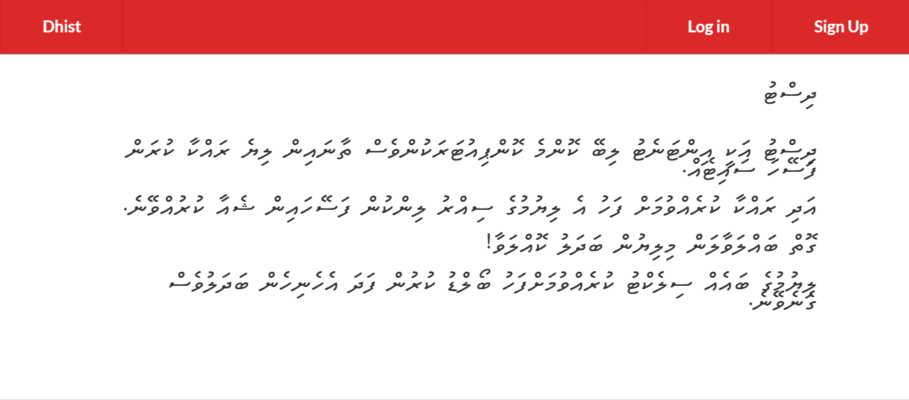
Haveeru Online, the Maldives' most popular online news site, published a profile on me on their Dhivehi version site recently as part of a profile-a-day series they are running for the month of Ramadan. Thanks Haveeru and the author Hussain Fiyaz Moosa for the lovely write up. :-).

The article is available here: ޖާވިޝް: އާ ދިރާސާތަކަށް އަބަދުވެސް ތައްޔާރު!

Me on Geeklyzer podcast

I had a chat recently with Shaff and Aman for the latest episode of their all-Maldivian tech podcast Geeklyzer.

Geeklyzer is the only ongoing Maldivian podcast I know of. They are doing a great job at keeping it going since 2008. Thanks guys for having me on :-)

Listen at Geeklyzer – Interview w/ Jawish Hameed, or via the embedded player below...

MAAS event - Venus Transit Watch, 6th June

Venus will be passing in front of the Sun (as viewed from Earth) on 5/6th of June. The transit can be seen in the Maldives on 6th June. The transit would have already started by the time the Sun rises over Maldives that morning. Venus reaches center at 6:31 AM and exits the exterior of the disc of the Sun at 9:52 AM. The next earliest visible Venus transit will not occur until 2117!

MAAS will be setting up several telescopes with solar filters at Lonuziyaaraiy and Henveiru park area to allow you to watch the Sun and Venus close up, safely, while Venus moves across the disc of the Sun. No fees and all welcome!

Warning: The Sun will be at full brightness unlike during an eclipse so using anything other than specialized solar filters can and will damage your eyes and is not recommended!

Time: 6:30 AM - 9:52 AM
Place: Henveiru Adu Park (infront of Raalhugandu)

"Super moon" misconceptions

There seems to be a lot of misunderstanding regarding the "super moon" event that took place on 5/6 May. A "super moon" is a non-technical term for when the elliptical orbit of the Moon brings it closest to the Earth - astronomers call that position the perigee.

However, the resultant change in size is not enough to produce much of a visually discernible difference. The awesome looking photos being spread on Facebook, news sites and elsewhere, where the Moon appears several times larger, are the result of common depth-of-field photographic techniques and/or post-editing. Also, it may help to keep in mind that the Moon appears larger when near the horizon thanks to an illusion called the "Moon illusion".

Full Moons are beautiful though :-)

Transit of Venus on 6th June visible in Maldives

There is an exciting and rare astronomical event occurring this coming June: Venus will be passing in front of the Sun (as viewed from Earth) on 5/6 of June. The transit can be seen in the Maldives on 6th June. The transit would have already started by the time the Sun rises over Maldives that morning, allowing us to catch the event just as Venus reaches center at 6:31 AM. Venus exits the exterior of the disc of the Sun at 9:52 AM.

Venus is the brightest star in the night sky but during the transit, when Venus' orbit around the Sun takes it in between the view of the Sun from the Earth, Venus will appear as a black spot moving across the bright disc of the Sun. Solar filters are required to watch this (otherwise, be ready for eye damage!) and so is a binocular or telescope.

The next earliest Venus transit will not occur until 2117, so if this kind of thing gets you excited you might want to wake up early in the morning on 6th June 2012! Maldivian Association for the Advancement of Science will be holding an event - details later.

More information:
- 2012 Venus Transit - Sun-Earth Day (NASA)
- 2012 Transit of Venus (NASA)
- Transit of Venus (Wikipedia)
- Find out the exact time for your location


Source: http://hemel.waarnemen.com/venus/venusovergang_2012.html

Maldives Crime Statistics Visualized: 2008 - 2011

The Maldives Police Service revamped their website on the 29th, adding some interesting online services to their website. One of the things that I caught my interest was the crime statistics, a month by month tally of different crime categories from 2008 to 2012. As far as I am aware of, these data has not been easily, publicly available before. The data listing displayed on the site, while interesting, doesn't facilitate an understanding of the trends over the period - which I was more interested to see.

Anyway, I scraped the data from the site, put into a table on Google Spreadsheet and made a small trend chart. I am sharing it here in case anyone else is interested in such too. The data used for the chart can be accessed and downloaded in the related sheet.

There are a few interesting things that can be seen.
- Crime was apparently very low at the beginning of 2008, was high for much of 2009 and came back to 2009 levels in 2011.
- There is a drop in theft from 2009 to 2011.
- Traffic related issues has continued to drop through the years.
- Drug crimes reached a major peak at the end of 2008 and had a significant drop through 2009-2010.

Smoothing the trending lines should give a better view of overall trends but that's for another time...

- View chart on Google Spreadsheet and download data


Thaana on Android: Font Installer update

Early last year, I posted a font installer for Android that replaces the default fallback font with the free FreeSerif font that includes Thaana glyphs. That installer should still work on most older devices.

Here is a repackaged version of that installer which should work on most of the new devices with more recent versions of Android. This version has been tested on a Samsung Galaxy Note running Android 2.3.6 and a Samsung Galaxy S2 running the recently released Android 4.0 Ice Cream Sandwich.

Steps


1. As before, the device needs to be rooted. You can easily root your device using SuperOneClick (free/donationware).

2. Put the update zip file (see below) somewhere on your device. You could do this by downloading the file straight from the web on to the SD card of your device.

3. Power off your phone and boot into recovery mode. The specifics of how you do this depends on which recovery tool was installed during rooting of your phone. Try VolumeUp+Center Button+Power. If that doesn't work, use Google. If you have the CWM app installed, then you could just flash the zip through that.

4. Select the update from Zip option in your recovery tool and select the update_thaanafont_v2_jaa.zip file from the list and OK it.

5. The update should progress and will ask you to reboot once completed.

6. Congratulations you have a Thaana font installed. Thaana text on the Facebook, Twitter and other apps should appear OK now!


- Download update_thaanafont_v2_jaa.zip

Do drop me a message, here or on Twitter, if it works and if there are issues. Enjoy!