Blobsy 2 RC 8 released

Tuesday, June 6. 2006
Blobsy 2 just had another release checked out today. This latest release - Blobsy 2 RC8 - is, as usual, available at the Blobsy website.

I've fixed a few bugs in this latest release that hindered optimal performance and a few more that prevented desired functionality - including one that prevented the bot from starting conversations by itself. I have also updated the included Demo handler and added another handler to demonstrate the conversation starting abilities more clearly. This has been something that users have been whining for quite a while. Good that I got around to doing this finally :-P

Microsoft has recently allowed bots on its network. It is even running a bot development competition called Invasion of the Robots. They are offering cool cash prizes for the best bots. This is probably a move to promote the new Live Messenger series.

Anyway, I intend on updating Blobsy to the functionality introduced/updated in Windows Live Messenger. Blobsy will be updated/rewritten to be compatible with MSN P13, the communications protocol used by Live Messenger. The rewrite will probably see day light as Blobsy 3 sometime next month.
Pocket 110: Dhiraagu Directory for PocketPC and Smartphone

Wednesday, April 12. 2006
It is easter holidays for me at the moment and I seem to have more time on my hand than I can spend engaged in "productive" activities. So, in a moment of boredom this morning, I programmed a Dhiraagu telephone directory lookup application for Windows Mobile based Pocket PC and Smartphones.

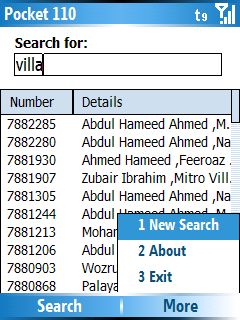
The program allows you to search the entire Dhiraagu telephone directory. The directory data comes bundled with the application and allows for quick and cheap directory lookups to be performed right on your phone. The directory includes landline numbers as well as mobile phone numbers. This is like the ultimate phone book! The program should run fine on pocket pcs and smartphones running Windows Mobile 2003 and later.

The application does require .NET Compact Framework to be installed. That shouldn't be a problem to Windows Mobile 2003 SE and Windows Mobile 5 devices as they comes with the framework preinstalled. The application takes up about 8Mb on the device, so make sure you install the program onto a SD card or whatever expansion storage supported by your device. The program can be installed simply copying the provided CAB files onto the device and executing them on the device.

Note: Windows Mobile 5 comes with application locking so that only digitally signed applications are allowed to install and run. You will need to remove this locking mechanism to allow your device to run the directory software. Here is a guide to removing application locking.

Download:
- Pocket 110 v1.0beta2 for Pocket PC (WM 2003/SE, WM 5.0)
- Pocket 110 v1.0beta2 for Smartphone (WM 2003/SE, WM 5.0)

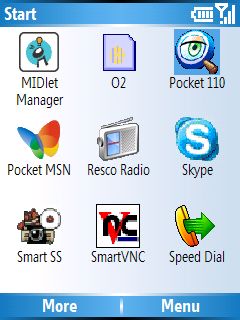
Screenshots:


Feel free to download and spread it. Drop a line in the blog comments if you have any suggestions, comments or just want to thank me (or whatever...) :-P

Enjoy!

Blobsy 2 RC7 released

Tuesday, April 11. 2006
I just issued a RC 7 version to Blobsy 2. Grab it at the Blobsy site.

The update simply fixes recent bot sign-in problems that apparently sprouted up after Microsoft made some changes to their Passport authentication system. Blobsy 2 releases up until now relied on hard-coded Passport domain to server mappings to handle various user domain groups. The MS update seems to have changed this and suddenly much of the Blobsy bots refused to sign in, after logging authentication failures in the log files.

The update was supplied by Thioz, who fixed the problem after encountering the problem with his live Blobsy bot. Kudos to Thioz for the update and for letting me know! I haven't been using Blobsy for a little while now, so I was not aware there was a problem in the first place... hehe.

Toodles.

Accent2RTF Converter and MLS Converter

Sunday, April 9. 2006
These are programs that I published on my (previous) digital playground at maldivianunderground.net. The site has been offline for ages, yet these two software are something quite a lot of people ask me for. So here they are; the Accent2RTF converter and MLS Converter.

Accent2RTF Converter
Accent and Accent Express have been used for creating Dhivehi documents for quite a while and remains in high use even now. Unfortunately however, the Accent format is not supported in any of the Microsoft Word or OpenOffice versions and an independant converter is needed to convert the Accent prepared documents for use in these software. This is where Accent2RTF comes into play: point it to a Accent (*.acc) file and it will spit out a RTF (*.rtf) file that can be opened and used in any text editing software that supports RTF formats (eg. MS Word, OpenOffice Write). This is the original version as it was first released in 2001.
- Download Accent2RTF Converter 1.0 Installer ( 217Kb, MS Windows only)

MLS Converter 2
Multi Lingual Scholar is a text editing software that has been used for the creation of Dhivehi documents on computers since 1988, I believe. However, it requires MS DOS to run and the software was discontinued in 1998. The use of MLS has greatly decreased since the introduction of dhivehi text entry using Unicode on Windows XP and later Microsoft operating systems. Despite this, there remain a bundle of MLS format files that were created in its time. This converter takes in any MLS (*.mls) file and gives out a RTF file for use in Microsoft Word and all the other various RTF supporting text editing software. MLS Converter was first released in 2001 and updated to version 2 a year later.
- Download MLS Converter 2 Installer ( 221 Kb, MS Windows only)

Enjoy!

Ajax flavoured Radheef released!

Thursday, March 23. 2006
Oh you all know what "radheef" is right? (Psst. In case you didn't know, Radheef is the Dhivehi dictionary.)

I had (err unlawfully?) ripped off the data from the Radheef released by the National Centre for Linguistics and Historical Research when the software came out a couple of years ago. It was those times that I was into the MaldivianUnderground project - and quite soon I had programmed an online radheef interface to do lookups. There have been various versions of the online radheef since then: one on MaldivianUnderground that relied on Dhivehi entry in latin, another on Bichoo.net that sported a Flash front-end and yet another somewhere that used what I call "dynamic font rendering" to show the output in Dhivehi - which is neat as it shows up whether the computer has Dhivehi fonts installed or not. However, all of these radheef apps no longer exist, thanks to the disappearance of each of the projects that the radheef was released under, and so I decided to slap up yet another radheef!

The new radheef now resides at its own domain name at http://www.radheef.com/. A cool feature maybe the ability to link to words definitions directly via the use of special URLs like this.

The radheef will be kept alive this time hopefully. Give it a spin. It will be useful if you work with Dhivehi and, like me, have questionable command over Dhivehi vocabulary. Please note that it is at an "experimental" stage at the moment and might not work smoothly on all browsers/operating systems. I'd appreciate if you let know if that is the case - do mention the browser name/version and your operating system name/version.


Techie stuff:
This latest version of my online radheef uses AJAX technology - to suit the current ajax application craze. The new radheef also relies on Unicode Dhivehi and you should be able to enter and read the Dhivehi used on the radheef as long as you have a recent browser with Unicode support. Further options to enable you to use the radheef without having Dhivehi fonts installed would be made available later. The radheef does require that you have JavaScript enabled but that shouldn't be a problem to most, after all almost all browsers these days come with JavaScript and unless you have turned it off manually, the radheef should work fine.

I should note that the Unicode text entry is a bit dodgy at the moment. The text entry relies on Unicode fonts coupled with a custom written keyboard handler (in JavaScript) to map the normal keycodes into Unicode. I shall be releasing the JavaScript keyboard handler script under GPL soon. The script is again something that I had written a couple of years ago but has now been rewritten to accommodate the browser advances and changes. I have tested the handler to work fine under IE 6, Firefox 1.5, K-Meleon 0.9.1, Safari and Opera 9.